In the /Search/Results.html page when I filter based on custom fields(province, category, subcategory) it takes about 15 seconds to display the filtered results but, when filtered on queue, status, open by, created it returns the results really fast. We faced this issue when there was a network outage on our side. During the network outage we lost connection with out db. After connecting back to the db we faced this issue. Also our objectcustomfiledvalues table has over 83 Million rows (12 GB in size). Should I reduce the table size? will that bring back performance ?
Check the rt.log for errors or warnings.
Maybe there are bogus items or other hints.
Check the database’s logs for corrupted items. Try to rebuild the index.
To narrow down the source of the slowness, remove most of the columns in your results and try starting with a search that returns a small number of tickets to start, then filter. Depending on the number of type of columns in the search results, RT can do a bunch of work rendering the results, which isn’t dependent on the original search itself.
For production i disabled RT to log in a file. And did the reindex tables and removed invalid indexes as well. I think the problem lies in the DB itself.
I took a dump of production db and imported in the dev server and reduced the columns as well, but no luck. I noticed this problem was only in Back Office Dashboard not in other departments. And all of the tickets has Back Office as Queue(over 8 Million Tickets), and a custom field creator department is used to track the creator. The reason other Dashboards are fast is that there are 300+ daily tickets whose queue is SAF, NOC …, and all other departments have Back Office as their queue. Maybe i should reduce the number of tickets whose queue is back office or delete old tickets.
Hi @Jim_Brandt
Maybe we’re facing a similar issue, didn’t track down yet. I searched the value of an CustomField ‘customer-ID’. Type is one Value and Values are eight digits. Most queues use this mandantory CF.
The week before last week a search for a given c-ID slows down the whole system (less than 800.000 tickets). It was that slow one can see the animated red hook if createing or displaying a singel ticket. Same time the responseness with root-account in another browser (Firefox and Chrome) works like a charm. Swapping browser show the same, it follows the account. If you copy the shortlink for the search to root-account it slows down, too.
The log showed some bogus tickets but we did not solve them yet. The load and other paramters were fine.
Last week the issue disappeared. The search itself is still quite slow but it does not slow down the account any more. Result are 6 tickets. The number of colums has no effect. Another search with 14 terms results 2700 ticket finishes “on click”
I know this text is not valid to analyse the issue. Maybe the exchange leads to new ideas.
While writing do some testing: If I remove clauses from the statement the search slows down a bit with each statement I remove. Additional clauses on Subject or Create speeds up.
Testing the other way: adding AND Subject LIKE 'test' to the above mentions search it shows two of the six tickets “on click”.
@Ali_Sina_Yousofi are your search-clauses more than the CF or is it only the CF?
Try to add other clauses. Maybe add created or created_relative.
Just as another data point we had to tweak some searches where our service desk had used “LIKE” in a large number of ANDed search terms. Those “LIKE”s could easily be replaced with straight equality, and then the whole thing speeded up (as in stop taking the RT instance in to slow-motion mode for a minute or two each time they ran the search). I also knocked up a little local callback that quietly converted “LIKE” to “SHALLOW LIKE” which also helped.
After playing with searches and after my answer above I shut down my client and drove to the office. Now the whole RT ist slow with my account again. It takes 18sec to display one single ticket with 5 transactions. The root-account works fine with the same ticket, instand display.
Switiching from LIKE to equal = speeds up a lot an the rest of the system is fast again on my account. Thank you @GreenJimll for this hint.
It is interesting what happens after the the search to slow down the system.
My search clauses are only one CF most of the time.
Thanks @GreenJimll
I could not find the file to change ILKE to equal. I searched the Build.html file and it wasn’t there I think. Could you please tell me where to find and change it ?
It was manual operation: I edited all the LIKES in their saved search to ‘=’.
Thanks
As you can see in the screenshot the filters are run in /search/results.html. When filtering on custom fields like category, subcategory, problem type, province, language the search is slow. when you click on category custom field filter a pop up list of all categories are displayed. When check a radio button from the list and you click apply then it takes about 14 seconds to return the filtered results.

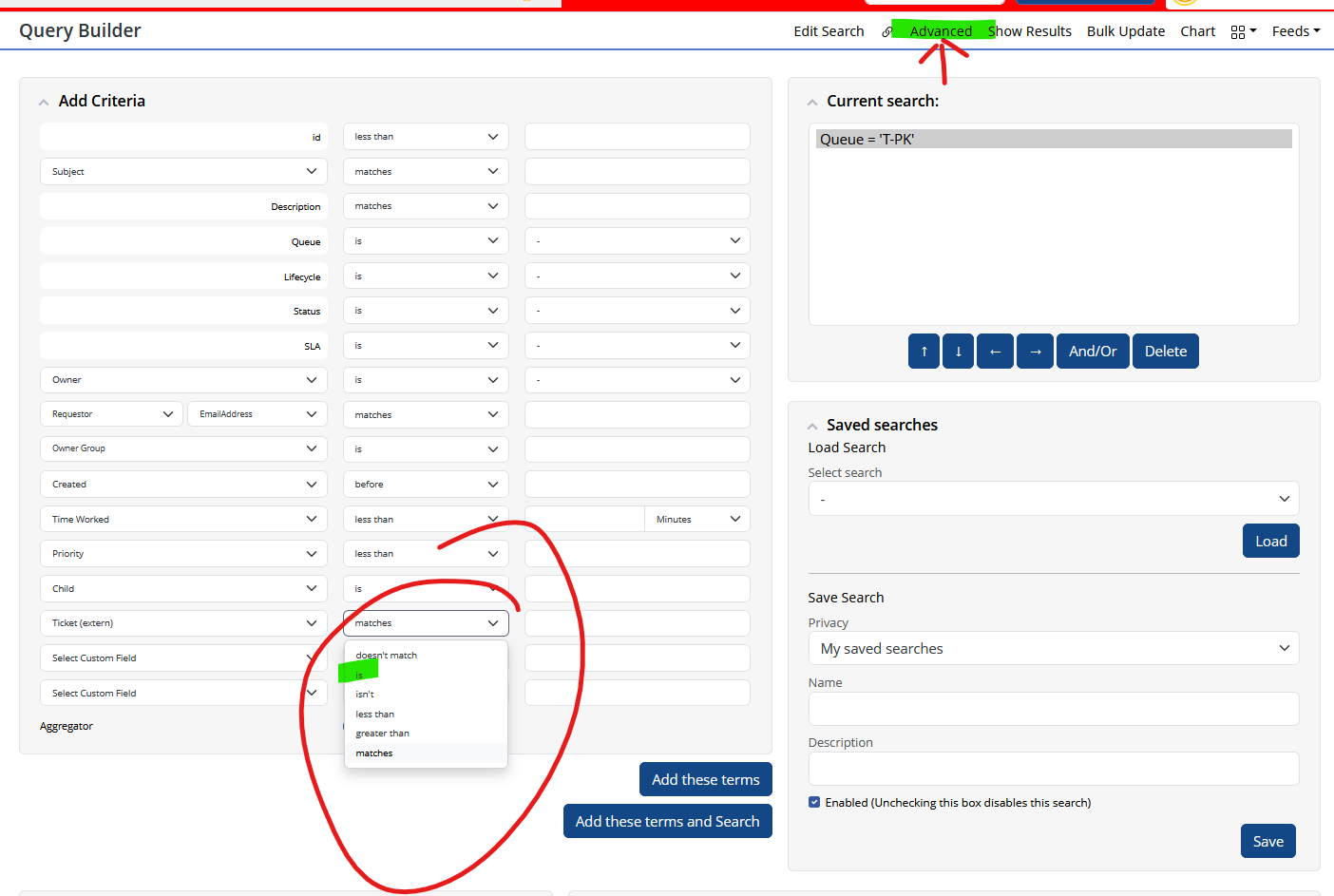
Using the filter icons in RT generates a search. You can use “Edit Search” or “Advanced” in the results’ menu bar to view and edit the search RT had build.
There you can change “matches” to “equal” in the GUI, or use “Advanced” to edit the clause as text. However, I was talking about Enter one Value while you are referring to Select one. Regardless, you can try different things using this dialogs.
ou might also consider using stored searches to do the job you want to do.
I am not sure how to configure the filter icons themselves, but perhaps you will find a way to speed up the process. Changing the icons would be the second step.